English
 Arabic
 French
 Spanish
 Portuguese
 Deutsch
 Turkish
 Dutch
 Italiano
 Russian
 Romaian
 Portuguese (Brazil)
 Greek

Loyalty Program App Development for Personalized Rewards
Technology & Software |
2026-10-13 11:35:33
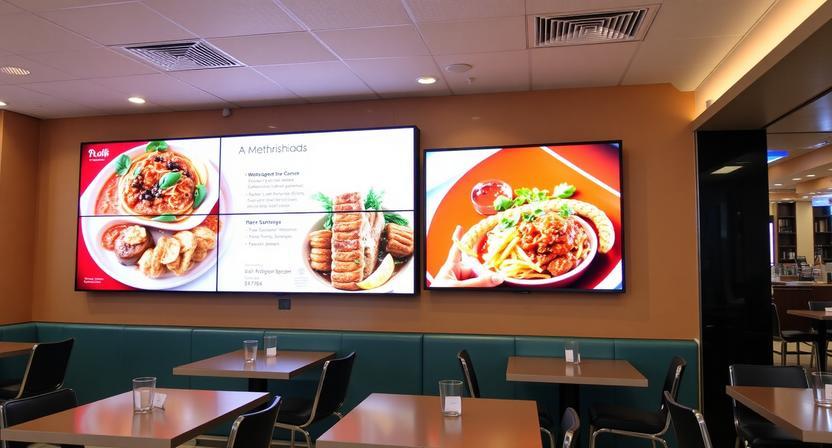
The most valuable salesperson in a modern restaurant never calls in sick, never forgets to upsell, and updates its pitch whenever prices change. It is the digital menu board, and its drive-thru counterpart is becoming one of the most effective sales tools in fast-food restaurants.
Both displays reach customers at the moment they decide what to purchase and how much to spend. Get them right, and they can deliver considerable value over time. Get them wrong, and you may end up with an expensive source of confusion at the point of sale.
This article discusses digital menu boards and drive thru digital menu boards, why they matter, and how to design and implement them in ways that can improve restaurant performance.
Digital menu boards replace traditional printed menus and are usually displayed behind the counter or above the ordering area. They operate through commercial screens with media players or embedded signage software and can automatically change content based on the time of day, inventory availability, or promotions.
Unlike a fixed printed board, a digital menu board is a dynamic sales tool. Breakfast items can disappear at 10:30 a.m. and be replaced by lunch combos. A sold-out item can be removed within seconds. A high-margin side dish can be highlighted with subtle animation to attract attention.
There is no need to reprint menus or climb a ladder with a roll of tape whenever something changes.
The case for digital menu boards rests on four practical benefits.
Speed and cost of updates. Printed menus come with recurring costs that are easy to overlook, including design time, printing, shipping, and waste whenever prices or items change. Digital boards can be updated within minutes, whether in a single restaurant or across a hundred locations.
Visual selling. Food appeals to the senses, and photography plays an important role in how customers respond to it. Digital boards allow restaurants to pair menu items with appetizing images, subtle movement, and strategic positioning. A well-designed board can guide attention toward high-margin products without appearing pushy.
Dayparting. A single screen can display breakfast, lunch, dinner, and late-night menus at scheduled times. This is particularly useful for restaurants with long operating hours or different offerings throughout the day.
Accuracy. Integration with point-of-sale systems can help keep prices accurate and automatically remove sold-out items. This reduces confusion at the counter and prevents customer frustration.
Drive thru digital menu boards use the same fundamental technology as indoor displays, but they operate in more demanding environments and under greater time pressure.
A drive-thru menu board is often the first, and sometimes the only, thing a customer sees before placing an order. With a queue of vehicles waiting behind them, every second of indecision matters.
Readability from a distance. Customers read these boards from inside their vehicles, often at an angle or under bright sunlight. Fonts should be large, contrast should be strong, and layouts should remain simple. A confusing display slows down ordering and creates longer queues.
Durability. Outdoor displays face exposure to sunlight, rain, heat, dust, and changing temperatures. Commercial-grade outdoor hardware is essential because ordinary consumer screens are not designed to withstand these conditions.
Brightness. Sunlight can wash out a drive-thru screen, making it difficult to read. High-brightness displays are therefore important, along with suitable anti-glare treatments or protective enclosures where necessary.
Speed of understanding. A drive-thru menu should be easy to scan within a few seconds. A limited number of clearly presented items, large images, and an organized visual hierarchy are more effective than an overwhelming list.
Reliability. When a drive-thru display fails during the lunch rush, the entire ordering line can be affected. Offline content playback and remote monitoring help reduce disruptions and keep the system running.
Upsell prompts. Drive-thru boards provide valuable space for suggestive selling. Combo upgrades, limited-time offers, and add-ons can be highlighted while customers are already deciding what to order.
Effective menu board design requires both creativity and discipline. Several principles apply to indoor counter displays and drive-thru boards alike.
Less is more. Every additional element competes for attention. Focus on the items you most want to sell, and place less important information on a secondary screen or app.
Highlight your bestsellers. Position popular and high-margin products prominently, where customers can notice them quickly. Use motion sparingly, as constant flashing or movement can overwhelm viewers and slow down decisions.
Photography matters. Invest in high-quality photographs of the food you actually serve. Generic stock images can weaken trust, while poorly lit pictures can make even delicious food look unappealing.
Consider viewing distance. Test the board from the distance and angle at which customers will actually read it. Font size, screen dimensions, and contrast should be appropriate for that viewing position.
Keep layouts consistent. Customers become familiar with the structure of your menu. Keeping main dishes, sides, and drinks in predictable locations makes ordering easier and reduces unnecessary questions.
Design for accessibility. Menu boards should be readable for as many customers as possible. Use high-contrast colors, clear typography, and multilingual options where they are needed.
Good design is only half the battle. The other half is running the system properly.
Integrate with the POS. When supported by the system, prices can update in real time and sold-out items can be removed automatically. This helps prevent mistakes and awkward conversations between customers and staff.
Plan ahead. Establish a dayparting schedule so menus change automatically between breakfast, lunch, dinner, and other service periods. Review the schedule regularly and adjust it for seasonal changes.
Monitor screens remotely. Notifications about offline displays, failed playback, or storage problems allow operators to identify and resolve issues before they affect customers.
Train employees to make updates. The manager on duty should be able to remove an item or change a price quickly. If only one person understands the software, that person becomes a single point of failure.
Audit the boards regularly. Walk through the restaurant and look at the displays from a customer's perspective. Are any promotions outdated? Are prices correct? Is anything difficult to read? A fresh look often reveals problems that staff may overlook during daily operations.
Most common failures are preventable. These include overcrowding a screen with too many items, leaving outdated promotions in place, using consumer-grade hardware outdoors, and displaying too much text without a clear visual hierarchy.
Another costly mistake is choosing digital signage software without first confirming that it is compatible with the restaurant's existing point-of-sale system.
All these problems can be reduced through proper planning, while ignoring them can lead to unnecessary expenses and operational difficulties.
Digital menu boards and drive-thru displays are more than decorative upgrades. They are point-of-sale tools that can influence what customers order, how quickly they order, and how much they spend.
The technology is already well established. What makes the difference is how it is implemented.
Design your boards for clarity, integrate them with your existing systems, choose hardware suited to the environment, and keep the content accurate and up to date.
Do that, and your digital menu boards can work like a silent salesperson, helping customers make better choices while supporting your restaurant's sales goals every day.